3D Shiny Text Effect for Modern Design
Imagine scrolling through a landing page and pausing—not because of a bold headline, but because the words themselves seem to catch light like polished chrome. That subtle gleam, the gentle depth, the quiet sense of dimension: this is the quiet power of the 3D Shiny Text Effect for Modern Design. It’s not about flashiness for its own sake. It’s about visual clarity with intention—text that feels tactile, credible, and confidently contemporary.
What It Is—and Why It Stands Out Today
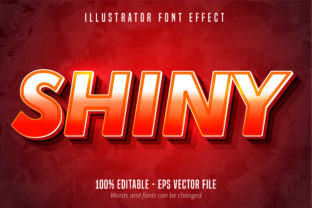
A 3D Shiny Text Effect layers depth, lighting, and surface reflection to make typography appear physically dimensional and luminous. Unlike flat gradients or basic shadows, it simulates how light interacts with curved or beveled edges—think glass, brushed metal, or liquid enamel. The effect relies on precise layering: a base typeface, offset shadows (often multiple), highlights positioned to suggest a consistent light source, and sometimes subtle ambient occlusion to ground the text in space.
Its relevance isn’t tied to novelty alone. In an era where users skim content in under eight seconds—and where digital fatigue makes visual monotony feel like friction—the 3D Shiny Text Effect offers a rare combination: legibility at scale and memorable presence. It works especially well for hero headings, brand statements, and interactive elements where first impressions matter most. Crucially, it does so without sacrificing accessibility: when implemented with sufficient contrast, semantic HTML, and CSS prefers-reduced-motion support, it enhances rather than excludes.
How Design Expectations Have Shifted
Five years ago, “flat design” dominated interfaces—clean, minimal, and deliberately two-dimensional. But as screens grew sharper, devices supported richer rendering, and audiences became visually saturated, flatness began to feel… neutral. Not bad—but undifferentiated. Users now expect interfaces to offer subtle cues about hierarchy, interactivity, and authenticity. A button that lifts on hover, a card that casts a soft shadow, or text that glints under simulated light—all signal craftsmanship and attention to detail.
This shift reflects deeper habits: people increasingly consume content across contexts—on a sunlit patio, in a dimly lit room, or during a quick mobile scroll. A 3D Shiny Text Effect adds perceptual weight. It doesn’t shout; it anchors. For marketers launching a premium service, educators designing course banners, or freelancers refreshing their portfolio, that grounded presence builds credibility faster than decorative illustrations ever could.
Practical Implementation—Without Overengineering
You don’t need WebGL or complex 3D software to achieve compelling results. Modern CSS—particularly text-shadow, transform, and clip-path—enables performant, scalable 3D Shiny Text Effects that load instantly and adapt responsively. For example:
- A headline using layered
text-shadowvalues (e.g., dark inset, mid-tone offset, bright highlight) creates convincing depth and shine. - Combining
transform: translateZ()withperspectiveon a parent container adds subtle parallax when paired with scroll-triggered animations. - SVG-based text allows for precise gradient meshes and clipping paths—ideal for logos or hero banners requiring pixel-perfect control.
The key is restraint. One strong highlight + one soft inner shadow + one subtle outer drop shadow often outperforms five overlapping effects. Test across devices: what reads as radiant on a MacBook Pro may wash out on an older Android screen. Prioritize contrast ratios above 4.5:1 against backgrounds, and always pair shiny text with ample whitespace—it needs breathing room to resonate.
Where It Fits Into Real Workflows
For business owners updating a Shopify store, a 3D Shiny Text Effect can elevate product launch banners without needing custom illustrations—cutting production time while increasing perceived value. Bloggers use it sparingly in newsletter headers or featured post titles to guide attention without overwhelming readers. Educators apply it to slide deck titles in LMS platforms like Canvas or Moodle, helping students quickly identify core concepts amid dense material.
Freelancers building Figma or Webflow sites report clients responding more positively to mockups that include this treatment—even when the rest of the UI remains intentionally minimal. Why? Because it signals care. It says, “We didn’t just pick a font—we considered how it lives in space.” That nuance translates directly into trust, especially in competitive niches like SaaS, wellness coaching, or creative services.
Evolving Beyond Decoration
Early uses of 3D text leaned heavily into skeuomorphism—imitating real-world materials like plastic or chrome, often excessively. Today’s approach is more refined and purpose-driven. Designers are pairing the effect with variable fonts (to adjust weight and width dynamically), dark-mode-aware gradients (so shine adapts to background tone), and even reduced-motion fallbacks that preserve depth without animation.
Emerging tools also simplify access. Plugins like CSSMatic’s Text Shadow Generator let non-developers preview and export layered shadow code. Figma plugins such as Shine & Depth apply realistic lighting models with one click—then output clean, editable CSS. These aren’t shortcuts—they’re accelerants for intentionality.
When—and When Not—to Use It
Use it for emphasis, not ubiquity. A 3D Shiny Text Effect shines brightest (pun intended) in high-impact moments: a call-to-action button, a brand manifesto line, or a testimonial quote that anchors a section. It works best with strong, geometric typefaces—like Inter Bold, Montserrat ExtraBold, or IBM Plex Sans—that hold crisp edges under transformation.
Avoid it in body copy, data tables, or forms. Don’t apply it over busy backgrounds or low-contrast color combinations. And never sacrifice readability for realism—if the effect makes scanning harder, it fails its core purpose. As one UX writer put it: “If your headline takes longer to parse because of the shine, you’ve designed the wrong thing.”
Looking Ahead—Subtlety as Strategy
The future of the 3D Shiny Text Effect for Modern Design isn’t about bigger glares or deeper extrusions. It’s about smarter integration: adaptive shine that responds to system preferences, generative highlights that shift with scroll position, or AI-assisted contrast optimization that ensures legibility across 100+ device profiles. What’s gaining traction isn’t complexity—it’s contextual intelligence.
That aligns with broader professional shifts. Creators increasingly value tools that reduce decision fatigue—not add more knobs to turn. Business owners prioritize assets that convert *and* maintain, not just impress once. And users reward designs that feel both human and efficient. A well-executed 3D Shiny Text Effect meets all three: it’s expressive, maintainable, and rooted in how people actually see and process information.
Getting Started Thoughtfully
If you’re exploring this effect for the first time, begin with a single element on a live page—not a full redesign. Try a hero heading using only two text-shadow layers: one dark inset (e.g., inset -2px -2px 4px rgba(0,0,0,0.2)) and one bright offset (e.g., 2px 2px 6px rgba(255,255,255,0.7)). Adjust values incrementally. Compare it side-by-side with the flat version. Ask: Does it draw attention without distraction? Does it feel intentional—not tacked on?
Then test with real users. Not via surveys, but observation: do they pause? Do they read the headline aloud? Do they scroll past faster—or linger? That feedback matters more than any trend report.
Ultimately, the 3D Shiny Text Effect for Modern Design endures not because it’s technically impressive, but because it answers a quiet, persistent need: to make words feel substantial in a world of fleeting pixels. It’s typography with gravity—and in design, gravity earns trust.